


Cloud security becomes difficult for one simple reason: your cloud environment is constantly changing.
A developer creates a new API. Someone grants a broader IAM role to troubleshoot an issue. A storage bucket becomes publicly accessible. An old API key remains active. A new workload is deployed without the same security controls as production.
None of these actions necessarily looks dangerous by itself.
Together, they can create an attack path.
That is why effective cloud security is not simply about enabling encryption or buying another security tool. The real question is:
Can you identify who can access your cloud resources, what they can reach, how those resources are exposed, what is changing, and whether you can recover if an account or workload is compromised?
The following cloud security tips focus on those questions.
What are the most important cloud security tips?
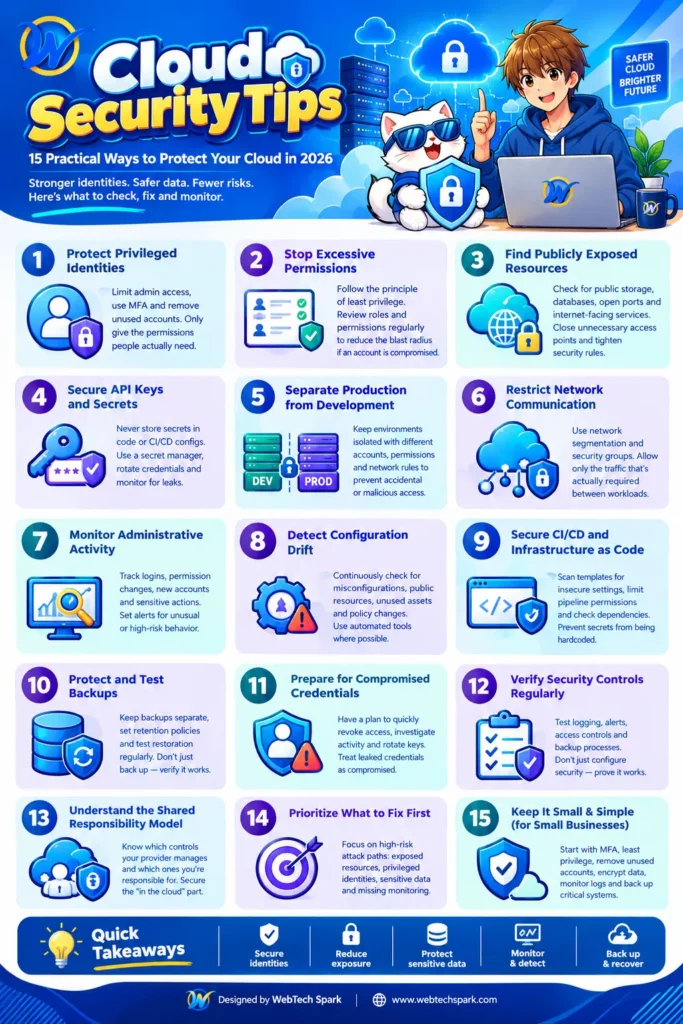
If you need a practical starting point, concentrate on these areas first:
- Protect privileged identities.
- Remove excessive permissions.
- Find publicly exposed resources.
- Eliminate unmanaged secrets and API keys.
- Separate production from development.
- Restrict network paths between workloads.
- Monitor administrative activity.
- Detect configuration drift continuously.
- Secure CI/CD and infrastructure-as-code.
- Protect and test backups.
- Prepare for compromised credentials.
- Regularly verify that security controls still work.
These aren’t arbitrary checklist items. They correspond to the major control areas emphasized by current cloud security guidance from AWS, Microsoft, and Google Cloud.
But knowing the list isn’t enough. The important part is knowing what to look for.
1. Start with the question: Who can access your cloud?
Before worrying about advanced security products, map your identities.
You should be able to answer:
- Who has administrator privileges?
- Which accounts can access production?
- Which service accounts exist?
- Which applications have cloud credentials?
- Which third-party vendors have access?
- Which users have not logged in for months?
- Which identities can access sensitive data?
- Which credentials never expire or rotate?
This is where cloud security often becomes an identity problem rather than an infrastructure problem.
Why is excessive cloud access dangerous?
Suppose a developer needs read access to one production database.
Instead, they receive an administrator role because it is faster.
If that developer’s credentials are compromised, the attacker may inherit the same excessive privileges.
This is why least privilege matters.
The goal isn’t simply to create fewer administrators. The goal is to make permissions correspond to actual tasks.
For every high-privilege identity, ask:
“What does this identity actually need to do?”
Then remove everything unrelated.
Microsoft’s current Azure security guidance specifically treats identity and access control as a core security area, while Google Cloud’s security guidance similarly emphasizes authentication, authorization, IAM roles, and privileged access.
2. Is MFA enough to secure cloud accounts?
No.
MFA is extremely important, particularly for privileged accounts, but it isn’t the complete identity strategy.
A stronger cloud identity setup looks at:
Authentication + authorization + privilege + session + monitoring.
For example, consider an administrator account with MFA enabled.
If that account has unrestricted access to every production system, MFA reduces the probability of account takeover but doesn’t solve the problem of excessive privilege.
Where supported, organizations should also consider phishing-resistant authentication such as passkeys or security keys for sensitive administrative access.
Then examine what happens after authentication.
Can the user:
- Create new administrator accounts?
- Disable logging?
- Create access keys?
- Change network rules?
- Access production databases?
- Download sensitive data?
- Modify security controls?
That’s the difference between simply asking “Does the account have MFA?” and actually evaluating cloud identity security.
3. How do you find dangerous cloud misconfigurations?
Don’t start by searching randomly through hundreds of cloud settings.
Start with exposure paths.
Look for resources that combine:
Internet exposure + valuable data + excessive permissions + weak monitoring.
For example:
Publicly reachable application → compromised application → overly privileged workload identity → sensitive database → large-scale data access
That is more important than a low-risk configuration warning on an isolated development server.
Misconfigurations remain a major cloud-security concern. Tenable recommends combining infrastructure-as-code scanning with runtime monitoring and prioritizing misconfigurations that create actual exposure paths across identity, data, and workloads.
What should you check first?
Search your environment for:
- Public storage
- Public databases
- Open management ports
- Internet-facing administrative interfaces
- Overly broad firewall rules
- Wildcard IAM permissions
- Unused privileged identities
- Long-lived access keys
- Disabled logging
- Unencrypted sensitive resources
This produces a much more useful security review than simply counting the number of “findings.”
4. Are your cloud storage resources accidentally public?
This deserves its own check because storage exposure can happen through configuration rather than sophisticated exploitation.
For every storage service, determine:
Who can access it?
Then ask:
Can an unauthenticated person access it?
And:
Can someone outside the intended organization access it?
Check:
- Bucket/container permissions
- Access-control policies
- Public URLs
- Anonymous access
- Cross-account sharing
- Temporary access links
- Object-level permissions
- Backup copies
Don’t assume that sensitive data is private because the storage service itself is hosted by AWS, Azure, or Google Cloud.
The provider secures the underlying cloud infrastructure; customers still have responsibilities for how cloud resources are configured and used. AWS explicitly describes this as security of the cloud versus security in the cloud.
5. Where should API keys and cloud secrets be stored?
Not in your source code.
This sounds obvious, yet secrets frequently appear in repositories, configuration files, CI/CD variables, container images, logs, and developer environments.
A better architecture is:
Application → identity/secret-management mechanism → required resource
rather than:
Application → hardcoded credential → cloud resource
Use your provider’s secret-management and identity capabilities where appropriate.
Then establish a lifecycle:
Create → use → monitor → rotate → revoke.
Don’t only ask:
“Where are our secrets stored?”
Also ask:
“Which secrets are still valid, who can retrieve them, and when were they last rotated?”
Microsoft’s current Azure security guidance specifically includes protecting secrets as a distinct best-practice area.
6. Should every cloud workload be able to communicate with every other workload?
No.
This is one of the easiest architectural mistakes to make.
Imagine an environment containing:
- Public web application
- Internal API
- Customer database
- Backup system
- Development environment
- Administrative systems
If everything can communicate with everything else, compromising one workload can provide an attacker with many possible routes through the environment.
Instead, define the communication that is actually required.
For example:
Internet → Web application
Web application → API
API → Database
But perhaps:
Internet → Database = blocked
Development → Production database = blocked
Web application → Administrative system = blocked
This is the practical value of network segmentation: reduce unnecessary paths.
7. How do you know whether cloud security controls are actually working?
This is where many security programs fall short.
Teams enable logging.
They configure alerts.
They deploy security tools.
Then nobody verifies whether the controls detect the events they are supposed to detect.
Test them.
For example:
Test 1: Identity
Create a controlled test event involving a privileged account.
Does your security team see it?
Test 2: Configuration
Make a controlled change to a security-sensitive configuration.
Does it generate an alert?
Test 3: Logging
Disable a test logging configuration.
Does anyone notice?
Test 4: Backup
Restore a non-production copy of a critical workload.
Does the recovery process actually work?
Security controls should be verified, not merely configured.
AWS describes its security approach around identifying, preventing, detecting, responding, and remediating security issues, which is a useful way to think about cloud security as a continuous cycle rather than a one-time configuration exercise.
8. Why is continuous monitoring more useful than an annual cloud security audit?
Because cloud environments don’t remain static.
An annual audit might tell you:
“The environment was configured correctly in January.”
It tells you much less about what happened in February, March, April, and the months afterward.
A developer can deploy a new workload tomorrow.
A new vendor can receive access next week.
A firewall rule can change this afternoon.
That creates configuration drift.
Therefore, cloud security should continuously monitor important changes.
Watch for:
- New privileged accounts
- Permission changes
- Public-resource changes
- Security-group changes
- New access keys
- Logging changes
- Encryption changes
- New internet-facing resources
- Changes to critical infrastructure
- Unusual administrative activity
Google Cloud’s current security guidance similarly emphasizes organization structure, authentication and authorization, networking, logging, monitoring, and detective controls as foundational security areas.
9. What should you monitor in cloud logs?
Don’t attempt to alert on everything.
Prioritize events that could indicate:
Account takeover
- Unusual authentication
- New credentials
- MFA changes
- Password or recovery changes
Privilege escalation
- Administrator-role assignments
- IAM policy changes
- New service accounts
- Permission expansion
Data exposure
- Public storage changes
- Large downloads
- Unusual database access
- Unexpected data transfers
Defense evasion
- Logging disabled
- Security controls changed
- Monitoring agents removed
- Audit settings modified
Infrastructure manipulation
- New compute instances
- Firewall modifications
- Network changes
- Unexpected production deployments
The purpose of logging isn’t to produce an enormous archive.
It’s to provide evidence of what happened and enough signal to react quickly.
10. Is infrastructure-as-code a cloud security issue?
Absolutely.
Infrastructure-as-code can improve security because infrastructure can be standardized and reviewed before deployment.
But insecure infrastructure can also be replicated extremely quickly.
Imagine a Terraform template containing:
- Public storage
- Excessive permissions
- Weak network rules
- Disabled logging
If that template is reused across 50 environments, you don’t have one security problem.
You have an automated security problem.
That’s why security checks should run before infrastructure reaches production.
Scan infrastructure-as-code for:
- Public resources
- Excessive IAM permissions
- Unencrypted storage
- Dangerous firewall rules
- Hardcoded secrets
- Missing logging
- Insecure defaults
This also addresses an important gap between traditional security reviews and modern cloud delivery.
11. What cloud security tip matters most for CI/CD?
Protect the pipeline identity.
CI/CD systems often need permission to deploy infrastructure or applications.
That makes their credentials highly valuable.
Don’t give every pipeline unrestricted administrator privileges simply because deployment is easier that way.
Instead:
- Separate build and deployment permissions.
- Use short-lived credentials where possible.
- Restrict production deployment identities.
- Protect CI/CD secrets.
- Require review for sensitive infrastructure changes.
- Scan dependencies and container images.
- Log deployment activity.
- Prevent untrusted code from obtaining production credentials.
The software supply chain is increasingly part of cloud security because applications, packages, containers, automation systems, and cloud infrastructure are tightly connected.
12. What should you do if a cloud access key is leaked?
Treat it as compromised.
Don’t wait to determine whether somebody actually used it.
A practical response is:
1. Identify the key.
Determine which identity owns it and what permissions it has.
2. Revoke or disable it.
Stop further use.
3. Investigate activity.
Look at authentication and API activity associated with the credential.
4. Determine what it could access.
Was it limited to one application or capable of reaching sensitive resources?
5. Replace the credential if required.
Update the application or integration using it.
6. Search for persistence.
Check whether the incident resulted in new users, keys, roles, workloads, or other changes.
7. Remove the original secret from places where it was exposed.
Rotating the credential alone doesn’t fix the underlying process that caused the exposure.
This is a much more useful cloud-security procedure than simply saying “rotate your keys regularly.”
How should backups fit into cloud security?
Think about backups from an attacker’s perspective.
If an attacker obtains sufficient privileges, can they:
- Delete production data?
- Delete backups?
- Modify backup policies?
- Access backup credentials?
- Encrypt recovery copies?
- Destroy recovery infrastructure?
A backup that the same compromised administrator can instantly delete isn’t a strong last line of defense.
For important systems, consider separation of duties, restricted backup access, appropriate retention, and recovery copies designed to resist accidental or malicious deletion.
Most importantly:
Test restoration.
A backup is a promise.
A successful restore is evidence.
What should small businesses prioritize in cloud security?
A small company doesn’t need to replicate the security architecture of a multinational enterprise.
Start with the controls that protect the highest-value assets.
First priority
Identity
- MFA
- Least privilege
- Remove old accounts
- Secure administrator access
Second priority
Exposure
- Find public storage
- Review internet-facing systems
- Close unnecessary ports
- Remove unused resources
Third priority
Data
- Identify sensitive information
- Encrypt it
- Restrict access
- Protect backups
Fourth priority
Visibility
- Enable audit logging
- Monitor privileged activity
- Alert on important security changes
Fifth priority
Recovery
- Back up critical systems
- Protect backups
- Test restoration
This gives a small team a realistic starting point without creating an enormous security program.
How does the shared responsibility model affect cloud security?
This is one of the most misunderstood parts of cloud security.
Cloud providers are responsible for securing the infrastructure they operate, but customers have responsibilities for the services and configurations they use.
The exact boundary depends on the service.
For example, the security responsibilities for a managed SaaS service won’t be identical to those for a virtual machine or container environment.
AWS explicitly describes this division as security of the cloud and security in the cloud. Microsoft and Google provide their own service-specific security guidance and responsibility models as well. AWS Documentation
So don’t ask:
“Is the cloud provider securing my application?”
Ask:
“Which security controls does the provider operate, and which controls am I responsible for configuring?”
That question produces a much more useful security assessment.
What should you fix first in a cloud security assessment?
Don’t prioritize findings simply by the number of vulnerabilities.
Prioritize attack paths.
For example:
Scenario A
A low-severity issue exists on an isolated development server.
Scenario B
A privileged cloud identity has excessive permissions and can reach a production database containing sensitive information.
Scenario B deserves much closer attention because the potential attack path is substantially more consequential.
A useful prioritization model is:
Exposure × Privilege × Data Sensitivity × Exploitability × Business Impact
You don’t need to calculate a perfect mathematical score.
Use the factors to ask better questions:
- Is it exposed?
- Can an attacker reach it?
- What identity controls it?
- What data can it access?
- Can the attacker move laterally?
- Can we detect the activity?
- Can we recover?
This is more meaningful than trying to fix every security finding in numerical order.
A practical 30-minute cloud security review
If you want something you can actually do today, start here.
First 5 minutes: privileged identities
Find every administrator and high-privilege service account.
Ask:
Do they all need this access?
Next 5 minutes: public exposure
Find:
- Public storage
- Public databases
- Open management interfaces
- Unnecessary public IPs
Next 5 minutes: credentials
Look for:
- Old API keys
- Unused service accounts
- Hardcoded secrets
- Credentials without rotation
Next 5 minutes: logging
Confirm that important administrative and authentication events are being recorded.
Next 5 minutes: backups
Identify your most important workload.
Ask:
When was the last successful restore test?
Final 5 minutes: attack path
Choose your most valuable cloud resource.
Work backward:
Who can access it? → How can they reach it? → What permissions do they have? → What would happen if that identity were compromised? → Would we detect it? → Could we recover?
That final exercise can reveal security weaknesses that a generic checklist won’t.
Cloud security isn’t about having more controls
The goal isn’t to accumulate security settings.
It’s to make unauthorized access difficult, limited, visible, and recoverable.
A well-designed cloud environment should make these questions easy to answer:
Who can access our critical resources?
Why do they have that access?
Which resources are exposed to the internet?
Where are our sensitive secrets?
What changed recently?
Would we know if an administrator account were compromised?
Could an attacker move from one workload to another?
Can we restore our critical systems if something is destroyed?
If your team cannot answer those questions, adding another security product probably isn’t the first thing to do.
Start by establishing visibility, reducing unnecessary access, closing dangerous exposure paths, and testing the controls you already have.
That’s the foundation of practical cloud security in 2026.