



Software applications have become increasingly complex. Even a simple food delivery app may include dozens of services, APIs, databases, authentication systems, payment gateways, notification modules, and analytics tools.
Without a structured way to organize these pieces, software quickly becomes difficult to understand, maintain, and scale.
That’s why learning how to classify software application components is one of the most valuable skills for developers, software architects, students, and IT professionals.
Rather than treating every module as just another piece of code, classification groups components according to their responsibilities, architectural layers, deployment model, or business purpose. This makes development faster, improves collaboration, reduces technical debt, and simplifies future upgrades.
In this guide, you’ll learn the modern approaches software teams use to classify application components, complete with practical examples and best practices you can apply immediately.
Key Takeaways
- Software application components should be classified based on their responsibilities, architecture layers, deployment models, and technical functions.
- Proper component classification improves software scalability, maintainability, and team collaboration.
- Modern applications typically include presentation, business logic, data access, integration, and infrastructure components.
- Following software design principles like modularity and the Single Responsibility Principle leads to cleaner architectures.
- Regularly reviewing component classifications helps keep applications organized as they evolve.
What Are Software Application Components?
A software application component is an independent module that performs a specific function within an application. Each component has a clearly defined responsibility and interacts with other components through interfaces or APIs.
Examples include:
- User authentication
- Shopping cart
- Product catalog
- Search engine
- Payment gateway
- Email notification service
- Reporting dashboard
- Database layer
Think of software components like the departments in a company. Marketing, Finance, HR, and Sales each perform different tasks, yet all work together toward the same business goal.
Why Classifying Software Applications Components Matters
Proper classification provides several benefits:
- Easier maintenance
- Better scalability
- Improved collaboration among development teams
- Faster onboarding for new developers
- Clear separation of responsibilities
- Reduced code duplication
- Simplified testing
- Improved software security
Large organizations such as Amazon, Netflix, and Microsoft rely heavily on component-based architectures to manage thousands of services efficiently.
The Four Primary Ways to Classify Software Application Components
1. Classification by Architecture Layer
This is the most widely adopted approach in modern software engineering.
| Layer | Responsibility | Example |
|---|---|---|
| Presentation Layer | User interaction | Web pages, mobile screens |
| Business Layer | Core application rules | Order processing |
| Data Access Layer | Database communication | SQL, ORM |
| Integration Layer | Third-party communication | Payment APIs |
| Infrastructure Layer | Logging, caching, monitoring | Redis, Prometheus |
Example
For an online shopping application:
- React frontend → Presentation
- Order Service → Business Logic
- PostgreSQL → Data Layer
- Stripe API → Integration
- Redis Cache → Infrastructure
2. Classification by Functional Role
Instead of focusing on architecture, this method classifies components based on the value they provide.
Core Components
These deliver the application’s primary purpose.
Examples:
- Checkout system
- Booking engine
- Recommendation engine
- Video streaming player
Supporting Components
These improve functionality but aren’t the application’s primary purpose.
Examples:
- Notifications
- Logging
- Reports
- Analytics
Infrastructure Components
These keep the application operational.
Examples:
- Load balancer
- Docker containers
- CI/CD pipelines
- Monitoring tools
3. Classification by Deployment Model
Modern applications aren’t always deployed the same way.
Common deployment categories include:
- Monolithic applications
- Microservices
- Serverless functions
- Shared libraries
- Containerized services
- Edge applications
For example, an AI chatbot might deploy:
- Authentication service
- AI inference service
- Billing service
- Analytics service
Each is deployed independently.
4. Classification by Technical Concern
Some components solve cross-cutting technical problems regardless of where they appear in the architecture.
Examples include:
- Authentication
- Authorization
- Logging
- Encryption
- Configuration
- Monitoring
- Caching
- Error handling
- Messaging
- File storage
These services often support multiple application layers simultaneously.
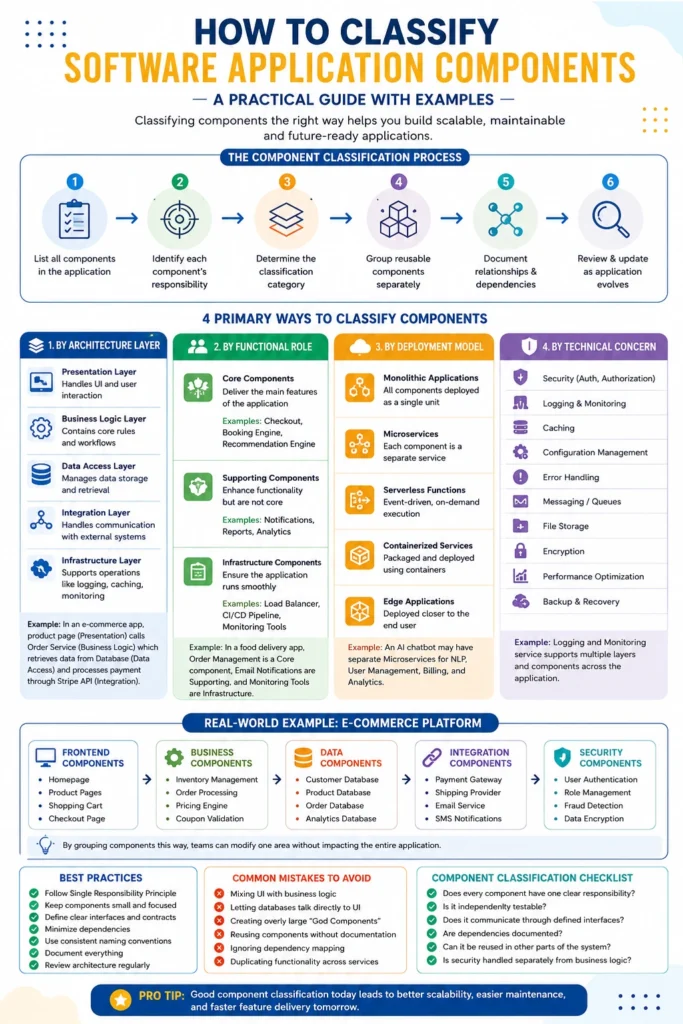
Real-World Example: E-Commerce Platform
Imagine you’re building an online marketplace.
Frontend Components
- Homepage
- Product pages
- Shopping cart
- Checkout page
Business Components
- Inventory management
- Order processing
- Pricing engine
- Coupon validation
Data Components
- Customer database
- Product database
- Order database
Integration Components
- Payment gateway
- Shipping provider
- Email service
- SMS notifications
Security Components
- User authentication
- Role management
- Fraud detection
- Encryption
By grouping components this way, developers can modify one area without disrupting the rest of the application.
Step-by-Step Process to Classify Software Application Components
Follow this workflow:
Step 1
List every module in the application.
Step 2
Identify each module’s primary responsibility.
Step 3
Determine whether it’s:
- User-facing
- Business logic
- Data management
- Integration
- Infrastructure
Step 4
Label reusable components separately.
Step 5
Document relationships between components.
Step 6
Review classifications whenever new features are added.
Common Mistakes to Avoid
Many teams struggle because they:
- Mix UI with business logic
- Allow databases to communicate directly with the frontend
- Reuse components without documentation
- Ignore dependency mapping
- Duplicate functionality across services
- Build overly large “God Components”
Keeping responsibilities focused leads to cleaner, more maintainable software.
Best Practices for Component Classification
To build scalable systems:
- Follow the Single Responsibility Principle
- Design reusable modules
- Define clear interfaces
- Minimize dependencies
- Keep documentation updated
- Use naming conventions consistently
- Review architecture regularly
Component Classification Checklist
Before deployment, ask:
- Does every component have one clear responsibility?
- Can the component be reused?
- Is it independently testable?
- Does it communicate through defined interfaces?
- Are dependencies documented?
- Is security handled separately from business logic?
If the answer is “yes” to all of these, your architecture is likely well organized.
Final Thoughts
Understanding how to classify software application components is more than an academic exercise—it’s a practical skill that leads to cleaner architectures, faster development, and easier maintenance. Whether you’re designing a small web application or a large cloud-native platform, using multiple classification perspectives—architecture, functionality, deployment, and technical concerns—helps create software that’s easier to understand, scale, and evolve over time.
As applications grow to include AI services, microservices, and cloud infrastructure, thoughtful component classification becomes even more critical. Teams that invest in a clear component strategy today are better prepared to build reliable, secure, and future-ready software tomorrow.
People Also Ask
What is a software application component?
A software application component is an independent module that performs a specific task within an application, such as authentication, payment processing, data storage, or user interface management.
What are the main ways to classify software components?
The most common methods are architecture layers, functional roles, deployment models, and technical concerns.
Why is software component classification important?
It improves maintainability, scalability, testing, collaboration, and overall software quality while reducing technical debt.
What is the difference between core and supporting components?
Core components provide the application’s primary functionality, while supporting components enhance the user experience or operational efficiency without defining the application’s main purpose.
Can one component belong to multiple classifications?
Yes. For example, an authentication service can be classified as a business component, a security component, and a microservice depending on the classification method being used.
What is component-based software architecture?
Component-based software architecture is a design approach where an application is built using reusable, independent components that communicate through well-defined interfaces.
What are the benefits of classifying software components?
Proper classification helps developers build scalable, maintainable, secure, and reusable software while reducing complexity and improving development efficiency.